


State management is critical to Terraform reliability and team coordination. Terraform's state file is the single source of truth mapping your configuration to real infrastructure — lose it, corrupt it, or let two people write to it simultaneously, and you're no longer managing infrastructure as code, you're debugging a mismatch between what Terraform thinks exists and what actually does.
Safe Terraform state management at scale requires a remote backend with locking, one state file per environment rather than relying solely on workspaces to separate production from staging, and modules organized by blast radius and rate of change rather than one monolithic configuration. Azure's azurerm backend has provided native, no-extra-resource locking via blob leases since its earliest releases; AWS's S3 backend now supports an equivalent native lockfile approach, replacing the older DynamoDB-based pattern that HashiCorp's own documentation now flags as deprecated. State locking prevents concurrent writes from corrupting state; state isolation prevents a mistake in one environment from touching another.
Key Takeaways
- Azure's
azurermbackend locks state natively by default, using an Azure Storage blob lease, with no separate resource to provision or manage — this has been true since the backend's earliest releases. - AWS's S3 backend now supports native state locking too, using a lockfile stored directly in S3 via the
use_lockfileargument — HashiCorp's own documentation states the older DynamoDB-based locking approach is deprecated and will be removed in a future minor version, so new S3-backed setups should use native locking rather than provisioning a DynamoDB table. - State locking prevents concurrent-write corruption, which is the most common way teams end up with a state file that doesn't match reality — two people or two CI runs applying changes to the same state at once.
- Folder/repository-per-environment is HashiCorp's own primary recommendation for state isolation, with Terraform workspaces treated as a secondary, CLI-level option rather than the default separation mechanism between, say, staging and production.
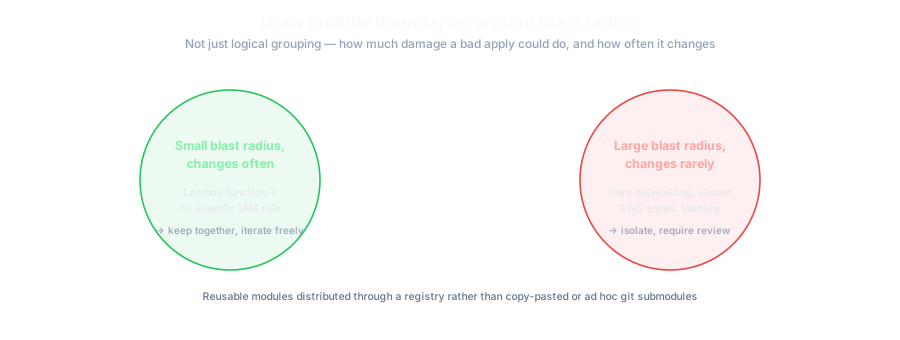
- Module boundaries should follow blast radius and rate of change, not just logical grouping. Resources that change frequently and have a small blast radius (e.g., a Lambda function and its specific IAM role) belong together; resources with a large blast radius deserve their own isolated state.
- A remote backend is not optional at any real team size. Local state files (
terraform.tfstatesitting on someone's laptop) don't survive a second team member touching the same infrastructure without immediate coordination problems.
What State Actually Does
Terraform's state file records the mapping between resources declared in your configuration and the real infrastructure objects that exist in your cloud provider. Every terraform plan and terraform apply reads this file to determine what needs to change. If the state file is stale, missing, or edited by hand incorrectly, Terraform's next plan will either try to recreate resources that already exist, or fail to recognize resources it should be managing — both of which range from annoying to genuinely dangerous depending on what's being (re)created or destroyed.
State Locking: Why It's Not Optional
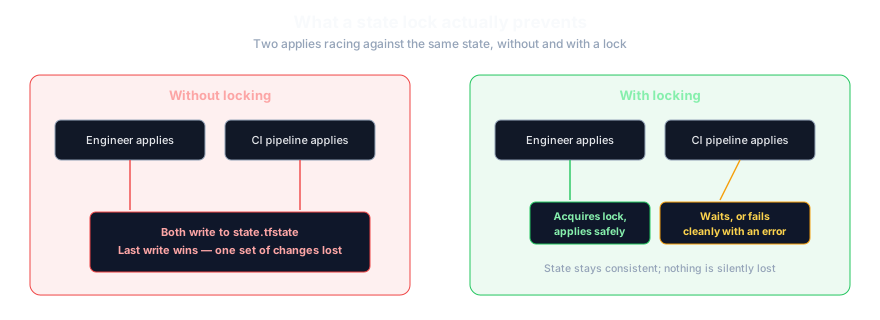
Without locking, two simultaneous terraform apply runs — from two engineers, or an engineer and a CI pipeline — can both read the same state, make conflicting changes, and write back results that corrupt the file or silently lose one set of changes. Locking prevents this by ensuring only one process can hold a write lock on the state at a time; any other process attempting to apply waits or fails cleanly instead of racing.
Azure: locking has always been built in
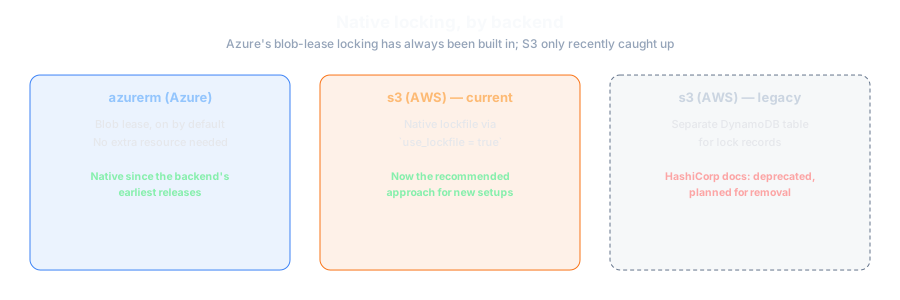
For Azure-first environments, the azurerm backend has supported native state locking through Azure Storage blob leases since its earliest releases, with no separate resource to provision. When Terraform begins an operation that modifies state, it acquires a lease directly on the state blob; a competing process attempting to acquire the same lease receives an error and either waits or fails, rather than racing to write. This is on by default and requires no additional configuration.
terraform {
  backend "azurerm" {
    resource_group_name  = "rg-terraform-state"
    storage_account_name = "sthaldentfstate"
    container_name       = "tfstate"
    key                  = "production/network.tfstate"
  }
}
AWS: native locking now replaces DynamoDB
The recommended approach on AWS has changed. HashiCorp's own S3 backend documentation confirms the backend now supports native S3-based locking, configured with the use_lockfile argument, which stores the lock directly alongside the state object in S3 rather than requiring a separate DynamoDB table — and explicitly states that the older DynamoDB-based locking mechanism "is deprecated and will be removed in a future minor version" (HashiCorp — Terraform S3 backend documentation). Teams still running older DynamoDB-based locking setups should plan a migration path; teams setting up new backends should use native locking rather than provisioning a DynamoDB table that will need to be retired later.
terraform {
  backend "s3" {
    bucket       = "my-org-terraform-state"
    key          = "production/network/terraform.tfstate"
    region       = "eu-west-1"
    use_lockfile = true
    encrypt      = true
  }
}
State Isolation: Environments and Modules
Separate state per environment
HashiCorp's own production-structure guidance recommends separating each environment (development, staging, production) into its own folder or repository, each with its own state, run independently via a separate terraform init — explicitly framing this as "important isolation to protect a production environment from any kind of experimentation done in staging" (HashiCorp — "Structuring HashiCorp Terraform Configuration for Production"). Terraform workspaces are mentioned as an available CLI mechanism for managing multiple states, but HashiCorp's primary structural recommendation is folder- or repository-level separation, not workspaces as the default way to isolate production from lower environments.
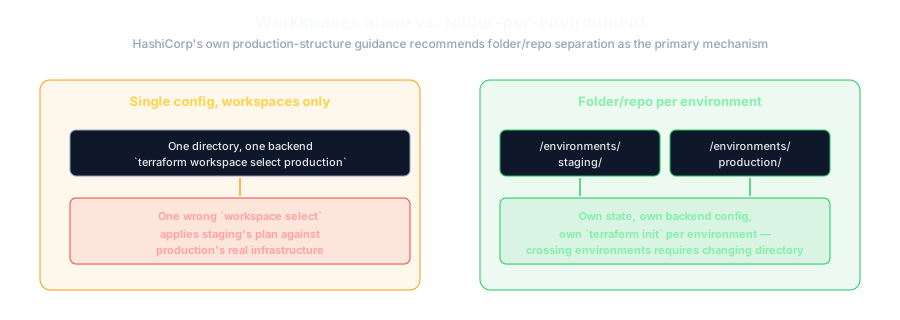
Using a single Terraform configuration with workspaces as the only separation between staging and production means a mistaken terraform apply while on the wrong workspace can affect production. Folder/repository separation makes this class of mistake structurally harder, since switching "environments" means actually changing directories and backend configuration, not just a workspace selector.
Module structure by blast radius, not just logical grouping
Rather than one large configuration managing everything, HashiCorp recommends breaking configuration into modules organized around blast radius, rate of change, scope of responsibility, and ease of management — for example, keeping a Lambda function together with its specific IAM role, since they change together frequently and have a contained blast radius, while giving broader, rarely-changed infrastructure (networking, for instance) its own more isolated state. Modules intended for reuse across teams should be distributed through a registry — either the public Terraform Registry or a private module registry — rather than copy-pasted or referenced as ad hoc git submodules, which reduces long-term maintenance overhead as the number of consuming teams grows.
Comparison: State Isolation Strategies
| Strategy | Isolation strength | Trade-off |
|---|---|---|
| Single state, workspaces only | Weakest | Easiest to set up initially; a wrong workspace selection can affect the wrong environment |
| Folder/repo per environment | Strong (HashiCorp's primary recommendation) | More initial setup and some configuration duplication, but structurally harder to apply to the wrong environment by mistake |
| Separate state per logical module (network, compute, data) | Strong, orthogonal to environment isolation | Smaller blast radius per apply, but requires managing dependencies between module states (e.g., via remote state data sources) |
Common Mistakes
Local state doesn't survive more than one person touching the infrastructure; committing state to git additionally exposes any secrets Terraform recorded in it to your entire repository history.
Given HashiCorp's own documentation now flags this as deprecated with removal planned, new S3 backends should use native locking (use_lockfile) instead of introducing a dependency that's already on its way out. This gap doesn't exist on Azure, where blob-lease locking has always been the default.
This is exactly the shortcut HashiCorp's own guidance frames as a risk to production isolation — a single miskeyed terraform workspace select away from applying staging changes to production.
Beyond the blast-radius risk, this also means every plan and apply becomes slower and the lock is held longer, increasing contention among teams working on unrelated parts of the infrastructure.
Direct edits are a common way to introduce subtle corruption; Terraform's own state manipulation commands (state mv, state rm, import) exist specifically to avoid hand-editing the file.
Cost, Complexity and Timeline
Setting up a remote backend with native locking is low effort for a new project and should be done from day one rather than retrofitted later — on Azure, this requires no additional resource at all beyond the storage account itself. Migrating an existing DynamoDB-locked S3 backend to native locking is low-to-moderate effort, primarily a backend configuration change and a coordination window to ensure no in-flight applies are running during the switch. Restructuring a monolithic state into environment- and module-isolated states is moderate-to-significant effort depending on how large and interdependent the existing configuration is, since splitting state requires careful use of terraform state mv (or equivalent import/move operations) to avoid resource recreation — this is best planned as a deliberate migration, not an ad hoc weekend project.
Security and Governance Considerations
Terraform state frequently contains sensitive values (database passwords, API keys) in plaintext within the state representation of a resource, even if the source configuration references a secrets manager — state should be encrypted at rest (Azure Storage encrypts blob data at rest by default; the S3 backend's encrypt option provides the equivalent on AWS) and access to the state bucket/backend restricted with the same rigor as access to production secrets themselves. Treat state storage access as a privileged permission in your IAM or Azure RBAC model, not an incidental one, since read access to state can expose secrets, and write access can silently corrupt or misdirect infrastructure changes.
How Halden Solutions Approaches This
From an engineering perspective, we default new Terraform setups on Azure to the azurerm backend's built-in locking and folder-per-environment isolation from the start — there's no locking infrastructure to provision, which removes an entire category of setup mistakes. For AWS-hosted state, we set up native S3 locking rather than a DynamoDB table that will likely need retiring later. For clients with an existing large, monolithic configuration on either cloud, we prioritize identifying natural module boundaries by blast radius and rate of change before attempting a full split, since a rushed state-splitting exercise is one of the more common ways teams accidentally trigger unwanted resource recreation.
Frequently Asked Questions
No. The azurerm backend locks state using an Azure Storage blob lease on the state blob itself, on by default, with no separate resource to provision or manage — unlike AWS's older DynamoDB-based pattern.
Not for new setups using the S3 backend — HashiCorp's documentation confirms native S3-based locking (via use_lockfile) is now supported and that DynamoDB-based locking is deprecated with planned removal in a future minor version. Existing DynamoDB-locked backends should plan a migration rather than treating it as a permanent requirement.
HashiCorp's own production-structuring guidance recommends folder or repository separation as the primary isolation mechanism, treating workspaces as a secondary CLI option — largely because workspace-only separation makes it easier to accidentally apply changes intended for one environment to another.
Use Terraform's built-in state manipulation commands (terraform state mv, import) to move resources between state files without destroying and recreating them. This should be planned and tested in a non-production environment first, since mistakes here can cause exactly the resource recreation you're trying to avoid.
Generally no — state can contain sensitive values in plaintext, and committing it exposes that data to your full repository history and anyone with read access to the repo. A remote backend with proper access controls is the standard approach on any cloud.
Conclusion
Terraform state management comes down to two disciplines: locking, so concurrent changes can't corrupt the source of truth, and isolation, so a mistake in one environment or module can't cascade into another. The specific mechanics differ slightly by cloud — Azure's blob-lease locking has always required no extra resource, while AWS's native S3 locking now replaces the DynamoDB pattern many existing setups still run — but the underlying principles (remote backend, real locking, environment separation stronger than workspace selection alone, module boundaries drawn around blast radius) haven't changed, and are worth getting right before state grows too large to safely restructure.
If you're auditing or restructuring your Terraform state setup for a growing team, Halden Solutions' Cloud & Platform Engineering team can help plan a safe migration path. See also our comparison of infrastructure-as-code tools and our guide to operating a cloud platform well.
Sources
- HashiCorp — Terraform S3 backend documentation (native locking via
use_lockfile) - HashiCorp — "Structuring HashiCorp Terraform Configuration for Production"
- HashiCorp — Terraform azurerm backend documentation
- OneUptime — Configuring Terraform Remote State with Azure Blob Storage and State Locking
- HashiCorp — Terraform state command documentation
- Terraform Registry — HashiCorp