


Kubernetes is powerful but requires operational discipline to run safely in production. Most of the incidents we see in production clusters don't trace back to Kubernetes itself misbehaving — they trace back to missing resource limits, permissive pod security settings, or autoscaling configured against the wrong metric. The platform is forgiving of bad defaults until it isn't.
Production-ready Kubernetes means every workload has explicit resource requests and limits, every namespace enforces a Pod Security Standard (Baseline at minimum, Restricted for sensitive workloads), autoscaling is configured against requests rather than limits, and there is a clear owner for cluster upgrades, node lifecycle, and incident response — including staying within the version support window your managed platform (AKS, EKS, or GKE) actually enforces. None of this is exotic — it's foundational discipline that most clusters skip under time pressure and pay for later.
Key Takeaways
- Resource requests and limits are not optional tuning — they determine scheduling and stability. Pods without requests can be scheduled onto nodes with insufficient real capacity; pods without limits can starve their neighbors.
- The Horizontal Pod Autoscaler scales against resource requests, not limits. A common misconfiguration is assuming HPA reacts to limit thresholds, which leads to autoscaling decisions that don't match the mental model the team designed around (Kubernetes documentation).
- Pod Security Admission replaced PodSecurityPolicy and enforces one of three standard levels — Privileged, Baseline, or Restricted — via simple namespace labels, with enforce/audit/warn modes (Kubernetes documentation).
- Restricted is the standard's own definition of hardened, requiring non-root execution, a read-only root filesystem, dropped Linux capabilities, and mandatory resource limits — it is the right default for anything handling sensitive workloads, not an exotic edge case.
- The NSA and CISA's joint Kubernetes Hardening Guidance names the same fundamentals as independently important. Its policy recommendations, as codified in Google Cloud's own constraint bundle for the guidance, cover pod security restrictions, RBAC and service-account limits, host-namespace isolation, per-namespace network policy requirements, and resource limit enforcement (CISA; Google Cloud documentation) — this isn't a Kubernetes-specific opinion, it's the same guidance two national cybersecurity agencies converged on.
- Every managed Kubernetes platform enforces its own version support window, and falling behind has real consequences. AKS supports the latest GA version plus two prior minors (N-2) and can force an upgrade if a cluster falls three or more versions behind (Microsoft Learn); EKS and GKE both offer a path to extend support on older versions at a cost, rather than supporting them indefinitely for free (AWS documentation; Google Cloud documentation).
Resource Management: Requests, Limits, and Autoscaling
Requests and limits
A request is what the scheduler guarantees a pod will get and uses to decide which node has room for it. A limit is the hard ceiling the container cannot exceed before being throttled (CPU) or killed (memory, via OOM).
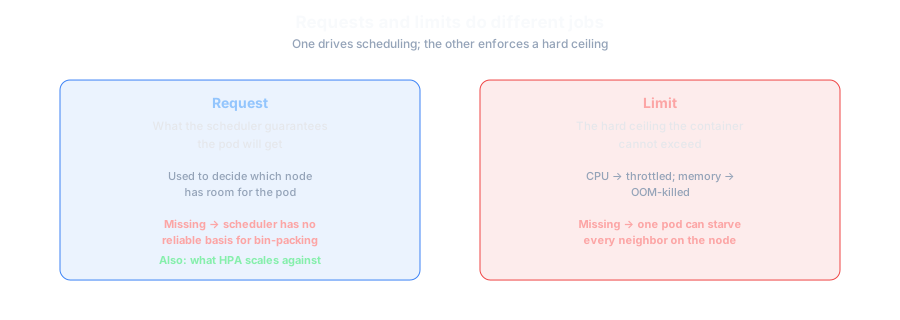
Omitting requests means the scheduler has no reliable basis for bin-packing pods onto nodes, which is how clusters end up with nodes that look fine on paper but are actually oversubscribed. Omitting limits means one misbehaving pod can consume enough resources on a node to degrade its neighbors.
Horizontal Pod Autoscaling
The Horizontal Pod Autoscaler (HPA) automatically adjusts the number of pod replicas in a Deployment or StatefulSet to match observed demand, based on metrics from the Kubernetes Metrics API, or custom/external metrics APIs for non-CPU/memory-based scaling (Kubernetes documentation). A critical detail teams frequently get wrong: HPA's percentage-based CPU/memory scaling calculates utilization against the pod's resource requests, not its limits — so a pod with a low request and a high limit will appear to hit its scaling threshold much sooner (in request-relative terms) than teams expect if they mentally sized their thresholds against the limit instead.
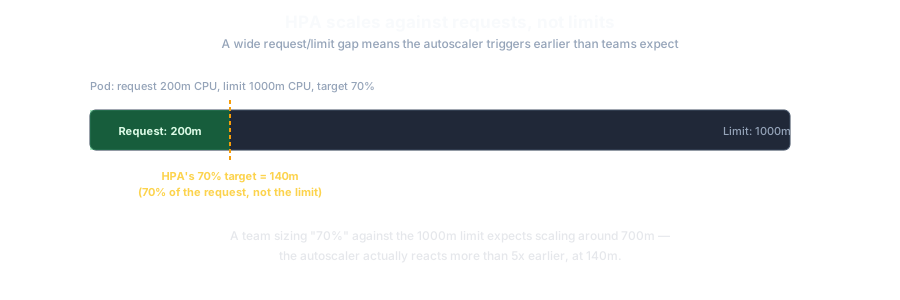
Setting a target CPU utilization of 70% while assuming it's calculated against the container's limit, when HPA actually calculates it against the request. If your request and limit are far apart, your autoscaler will trigger at a very different real CPU usage than the team expects.
Pod Security: What "Production-Ready" Actually Requires
Kubernetes enforces workload security posture through Pod Security Admission, a built-in admission controller that replaced the deprecated PodSecurityPolicy, applying one of three standard Pod Security Standards levels (Kubernetes documentation):
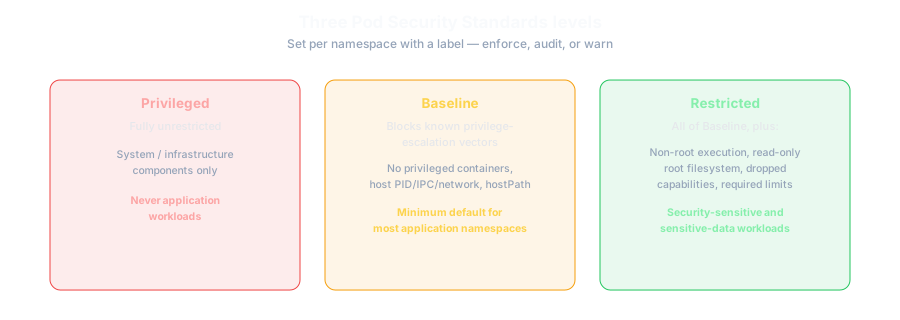
| Level | Restricts | Intended for |
|---|---|---|
| Privileged | Nothing — fully unrestricted | System/infrastructure components only, never application workloads |
| Baseline | Privileged containers, host PID/IPC/network access, hostPath volumes, privilege escalation, running as root | The minimum acceptable default for most application namespaces |
| Restricted | All Baseline restrictions, plus mandatory non-root execution, read-only root filesystem, dropped Linux capabilities, and required resource limits | Security-sensitive workloads and any namespace handling sensitive data |
Enforcement is configured with simple namespace labels, each with three independent modes — enforce (blocks non-compliant pods), audit (allows but logs), and warn (allows but warns the user):
apiVersion: v1
kind: Namespace
metadata:
  name: production-workloads
  labels:
    pod-security.kubernetes.io/enforce: restricted
    pod-security.kubernetes.io/audit: restricted
    pod-security.kubernetes.io/warn: restricted
Because this is a namespace label rather than a cluster-wide redesign, the practical barrier to adopting at least Baseline everywhere, and Restricted for sensitive workloads, is low — most clusters that skip it do so out of inertia rather than a genuine technical blocker.
This isn't just Kubernetes' own opinion about what "secure" means. The NSA and CISA's jointly published Kubernetes Hardening Guidance, first released in 2021 and updated in 2022, independently converges on the same fundamentals — pod security restrictions, RBAC and service-account scoping, host-namespace isolation, and per-namespace network policy — as the baseline for a hardened cluster, as reflected in the specific policy constraints Google Cloud built to enforce it (CISA; Google Cloud documentation).
Staying in Support: Version Policy on AKS, EKS, and GKE
Cluster upgrade discipline isn't only about avoiding known bugs — every managed Kubernetes platform enforces its own version support window, and falling out of it has consequences beyond "missing new features."
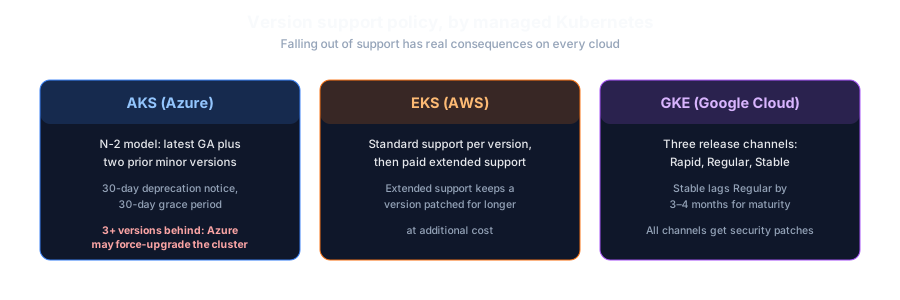
Azure Kubernetes Service (AKS) supports the latest generally-available minor version plus the two prior minors — an "N-2" model — and gives 30 days' advance notice before a version is deprecated, followed by a further 30-day grace period to upgrade; if a cluster is left more than three minor versions out of support and carries security risk, Microsoft's own documentation states Azure reserves the right to upgrade it automatically (Microsoft Learn). Amazon EKS provides standard support for each Kubernetes version for a defined window, after which a paid extended-support tier keeps a version patched for longer rather than supporting it indefinitely at no cost (AWS documentation). Google Kubernetes Engine (GKE) structures this differently again, through three release channels — Rapid (new versions roughly 1–2 weeks after upstream GA), Regular (about two months later), and Stable (a further 3–4 months after Regular) — with critical security patches applied across all three regardless of channel (Google Cloud documentation).
Upstream Kubernetes itself maintains the three most recent minor releases at any time — as of the current stable release, Kubernetes 1.37, that means 1.37, 1.36, and 1.35 are supported, with roughly a year of patch support per minor version from Kubernetes 1.19 onward (Kubernetes documentation). Every managed platform's policy sits on top of that upstream cadence, which is why "we'll upgrade eventually" tends to compound: falling behind upstream and behind your specific managed platform's support window are two separate clocks running at once.
Common Mistakes
- No resource requests or limits on application pods. This is the single most common root cause of "noisy neighbor" incidents, where one pod's resource consumption degrades unrelated workloads on the same node.
- Assuming HPA scales against limits. As above — HPA's default CPU/memory scaling uses resource requests, and thresholds set with the wrong mental model produce autoscaling behavior that surprises the team.
- Running everything at the Privileged pod security level "because it was the default that worked." Privileged should be reserved for system components; most application workloads run fine under Baseline or Restricted once actually tested against it.
- No clear owner for cluster and node upgrades. Kubernetes and its ecosystem move quickly; clusters that fall multiple minor versions behind accumulate both security exposure and eventual forced, high-risk upgrade jumps — and on AKS specifically, a cluster left too far behind can be force-upgraded by the platform itself.
- Treating namespaces as a purely organisational boundary rather than a security boundary. Without network policies and Pod Security Standards enforced per namespace — both explicitly named in the NSA/CISA hardening guidance — workloads in "separate" namespaces can often reach each other more freely than teams assume.
Trade-offs and Decision Guidance
Your team wants control-plane operations (upgrades, etcd management, API server availability) handled by the cloud provider, and is comfortable with the provider's specific integration points for networking, identity, and storage — and with that provider's own version support window.
Running your own control plane gives full configuration control, but the ongoing responsibility for upgrades, etcd backup/restore, and API server availability is substantial and often underestimated relative to a managed offering.
Cost, Complexity and Timeline
Establishing resource requests/limits and Pod Security Standards across an existing cluster is moderate effort, mostly because it requires auditing and updating every workload's manifests rather than any deep technical complexity — the labels and fields themselves are simple. Getting autoscaling correctly tuned is an iterative, ongoing effort, not a one-time configuration, since the right thresholds depend on real traffic patterns that take time to observe. Cluster upgrade discipline — staying within your managed platform's supported version window (AKS's N-2, EKS's standard-vs-extended support, or GKE's release channel) and testing upgrades in a non-production cluster first — is a recurring operational cost, not a one-time project, and should be budgeted as ongoing platform work rather than treated as done once the cluster is live.
How Halden Solutions Approaches This
We treat Kubernetes production-readiness as a checklist to verify explicitly, not an assumption to make: resource requests/limits present on every workload, Pod Security Standards enforced at Baseline minimum with Restricted for sensitive namespaces — aligned with the same fundamentals the NSA/CISA hardening guidance independently converges on — autoscaling thresholds validated against actual request values rather than assumed against limits, and clear ownership for cluster upgrades and node lifecycle relative to the specific support policy of AKS, EKS, or GKE. Where clients are deciding between managed and self-managed Kubernetes, we scope that decision against their team's actual capacity to own control-plane operations, not just the up-front cost difference.
Frequently Asked Questions
Do all pods need both resource requests and limits? Requests are strongly recommended for every pod so the scheduler can make sound placement decisions. Limits are especially important for CPU/memory-sensitive or untrusted workloads to prevent one pod from degrading others on the same node; the Restricted Pod Security Standard makes resource limits mandatory.
Does HPA scale on CPU limits or requests? Standard CPU/memory-based HPA scaling calculates utilization percentage against the pod's resource requests, not its limits. This is a frequent source of misconfigured autoscaling thresholds.
What's the difference between Baseline and Restricted Pod Security Standards? Baseline blocks known privilege-escalation vectors (privileged containers, host namespace access, hostPath volumes) while allowing most ordinary workloads to run unmodified. Restricted adds further hardening — mandatory non-root execution, read-only root filesystem, dropped Linux capabilities, and required resource limits — and is intended for security-sensitive workloads.
How many Kubernetes versions behind can we fall before it's a real problem? It depends on the platform, and the answer is "fewer than you'd think." AKS supports only the latest version plus two prior minors and can force an upgrade past three versions behind; upstream Kubernetes itself only maintains the three most recent minor releases at all. Treat version currency as ongoing platform work, not a someday task.
Is self-managed Kubernetes ever the right choice over a managed service? It can be, for organisations with specific control-plane requirements a managed offering can't meet, or with the platform engineering capacity to own upgrades and etcd operations reliably. For most teams, a managed control plane trades some configuration flexibility for meaningfully less operational burden.
Conclusion
Kubernetes rewards operational discipline more than it demands specialist expertise for any single feature. Explicit resource requests and limits, Pod Security Standards enforced per namespace, autoscaling tuned against the metric it actually uses, and clear ownership of cluster lifecycle relative to your platform's version support window are not advanced techniques — they are the baseline that separates a cluster that degrades gracefully under load from one that fails in ways nobody predicted.
If you're assessing whether your Kubernetes environment is genuinely production-ready, Halden Solutions' Cloud & Platform Engineering team can help review your current configuration against these fundamentals.
Sources
- Kubernetes documentation — "Pod Security Admission"
- Kubernetes documentation — "Horizontal Pod Autoscaling"
- Kubernetes documentation — "Releases"
- CISA — "Updated: Kubernetes Hardening Guide"
- Google Cloud documentation — "Using NSA/CISA Kubernetes Hardening policy constraints"
- Microsoft Learn — "Supported Kubernetes versions in Azure Kubernetes Service (AKS)"
- AWS documentation — "Kubernetes versions on standard support" (Amazon EKS)
- Google Cloud documentation — "About release channels" (GKE)